.png?width=152&height=40&name=OmniByte%20-%20PNG%20Black%20Letters%20Transparent%20Logo%207-2021%20(1).png "OmniByte - PNG Black Letters Transparent Logo 7-2021 (1)")

You bought the software. You rolled it out. You trained the team. And six months later, your field...
Your field platform works perfectly in the office. It syncs instantly during the demo. It looks great on the conference room screen. Then your crew drives 40 minutes to a remote site, walks into a concrete structure, or descends below grade, and the signal disappears.
What happens next is where most field software quietly falls apart.
The Moment Everything Stalls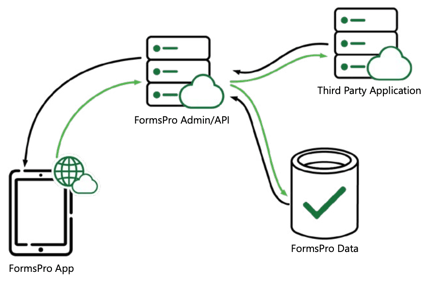
When a field platform depends on connectivity to function, a signal drop doesn't just pause data collection. It disrupts the entire workflow. Forms won't load. Submissions won't go through. Lookup fields that pull from your ERP return nothing. The tech is standing in front of the equipment, ready to work, and the tool they were given can't keep up.
So field techs improvise. They scribble notes on paper. They take photos and text them to someone back at the office. They tell themselves they'll enter it later, when they're back in range. Sometimes they do. Sometimes they don't. Either way, the data that reaches your system is late, incomplete, or secondhand.
For teams in construction, energy, utilities, manufacturing, and field service, unreliable connectivity is the norm. Basements, mechanical rooms, rural infrastructure, underground utilities, steel-framed buildings, remote pipelines: these are the places where the work actually happens.
The Cost of Lost Signals
Signal loss doesn't show up as a line item in the financial statements. It shows up as a customer service pattern: inspection data that arrives hours or days after the work was done. Compliance documentation with gaps nobody noticed until an audit. Maintenance decisions based on information that was current yesterday but not today.
The downstream effects on field operations compound quickly. A safety inspection captured on paper and entered manually the next morning means your system was blind to that condition for 18 hours. A service report that doesn't sync until the tech gets back to the shop means the client doesn't get their documentation on time. A work order status that never updates means the dispatcher is making scheduling decisions based on stale data.
None of these failures are obvious or dramatic. They're slow, quiet, and cumulative. And they're almost always traced back to the same root cause: the tool couldn't function without a signal, and the signal wasn't there.
"Offline Mode" Is Not the Same as Offline Capability
Some platforms advertise offline support, but the experience tells a different story. Limited offline mode might let a tech view a previously loaded form, but it won't pull in equipment data, enforce conditional logic, or generate a report. Cached forms might hold a submission locally, but if the app crashes or the device restarts before sync, the data is gone.
True offline capability means the platform is designed to work without a signal, with a simple preparation step built into the natural workflow. In FormsPro, the process works like this: a tech receives a task or work order in their existing system (such as IFS, Infor or another third-party ERP solution), taps a deep link to open the form in FormsPro, and that action initiates a sync. The form and all its dependent data, including equipment records, lookup fields, and conditional logic, download to the device. From that point forward, the tech can go fully offline. They complete the form with full validation, capture photos and signatures, and submit. The submission is stored securely on the device. When they're back in range and open FormsPro, everything syncs automatically and the submitted forms are sent to the server for processing.
The key is that this preparation step fits naturally into the workflow the tech is already following. They're not doing anything extra; opening the form from their work order is the sync. And once that sync is complete, the device has everything it needs to function independently. (For a closer look at how this architecture works, see the FormsPro Offline Capabilities overview.)
This distinction matters because your field team's process shouldn't change based on signal availability. Field techs shouldn't need to plan their route around Wi-Fi or change how they capture data depending on coverage. The tool should make connectivity a background condition, not something the tech has to manage.
What Your ERP Misses While It Waits
If your field data feeds an ERP without software like ours, signal loss can create a second problem beyond the field itself. Your ERP is only as current as the data flowing into it. When submissions are delayed by hours or days because a tech couldn't sync in the field, every system that depends on that data is working with outdated information.
Inventory counts are off. Work order statuses are stale. Compliance records have time gaps. Managers reviewing dashboards are seeing a version of operations that doesn't reflect what's actually happening on the ground. The ERP isn't broken; it's just starved of the real-time data it was designed to process.
This is where the connection between field tools and business systems becomes critical. A platform with true offline capability doesn't just protect the tech's workflow. It protects the integrity of your entire data pipeline by making sure every submission reaches your ERP intact and in order, regardless of what the signal was doing when the data was captured.
Connectivity Is a Condition, Not a Requirement
The instinct when facing connectivity problems is to look for better signal: boosters, hotspots, upgraded data plans. The more reliable solution is to remove connectivity from the equation at the point of data capture. Build your field data workflow on a platform that loads what it needs during a brief sync, then operates independently until the tech is back in range. When the tool works that way, connectivity stops being an operational risk and becomes irrelevant to data quality.
Your techs do better work when they're not troubleshooting their tools. Your data is more reliable when the sync is built into the workflow rather than left to chance. Your ERP performs better when it receives complete, validated submissions instead of partial data patched together after the fact.
We covered the broader picture of why field tools fail, including complexity and usability, in Why Complex Tools Fail in the Field (And What Actually Works). Connectivity is one piece of that puzzle, but it's often the piece that does the most invisible damage.
The Bottom Line
When the signal drops, ERP platforms can drop with it. The data gets delayed, the process breaks down, and your team reverts to manual workarounds that defeat the purpose of going digital in the first place.
It doesn't have to work that way. The right platform syncs what the tech needs before they head into the field, captures data with full functionality regardless of signal, and sends everything back automatically when connectivity returns. No extra steps. No lost records. No burden on your crew to manage the gap.
If your current tools can't do that, they weren't built for the field. They were built for the demo.
See how FormsPro handles offline field operations. Book a 15-minute walkthrough →.