.png?width=152&height=40&name=OmniByte%20-%20PNG%20Black%20Letters%20Transparent%20Logo%207-2021%20(1).png "OmniByte - PNG Black Letters Transparent Logo 7-2021 (1)")

Your field platform works perfectly in the office. It syncs instantly during the demo. It looks...
You bought the software. You rolled it out. You trained the team. And six months later, your field techs are back to paper forms, text messages, and workarounds held together by habit.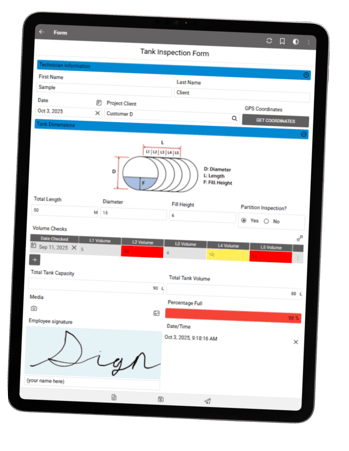
It's not a training problem. It's not a people problem. It's a software design problem.
Most field software was designed in an office, for an office. It assumes a desk, a keyboard, a stable internet connection, and an employee with time to click through nested menus. The field doesn't work that way, and when the tool doesn't match the environment, the environment wins every time.
If you're an operations leader watching expensive technology collect dust while your crew defaults to whatever gets the job done fastest, you're not alone. And the pattern is predictable. Field tools fail for the same three reasons, over and over again.
Field Software: Too Many Steps
There's a threshold in field software, somewhere around the fourth or fifth tap, where adoption falls off a cliff. Every additional screen, every dropdown menu, every required field that doesn't apply to the current job adds friction. And friction compounds.
Field techs don’t have time to navigate a multi-screen workflow just to log an inspection reading. They need to open the form, enter the data, and move on. When the software demands more attention than the task itself, the tool gets abandoned.
The irony is many of these extra steps were added with good intentions: more validation, more data capture, more compliance coverage. But there's a difference between capturing the right data and capturing all the data. The former drives decisions. The latter drives your team back to clipboards.
What actually works is conditional logic: forms adapting based on the answers your tech gives. Instead of showing every possible field on every form, the right fields appear at the right time. The tech sees only what's relevant to the job in front of them. Fewer taps, fewer errors, and the data is actually more accurate because the process guided them through it instead of overwhelming them.
FormsPro Software: Connectivity
For any organization running operations in construction, energy, utilities, manufacturing, or field service, connectivity is not a given; it's a variable. And any tool treating it as a prerequisite instead of a condition to work around is a tool that doesn't actually work in the field.
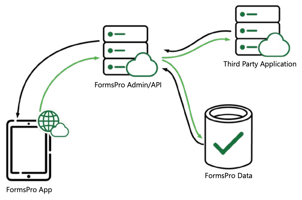
What works is true offline capability. Not "limited offline mode" or "cached forms." Full functionality: data capture, conditional logic, photo and signature capture, even dynamic tables—all without a signal. When connectivity returns, everything syncs automatically. No manual intervention, no lost submissions. Your crew shouldn't have to think about whether they have signal. The tool should handle connectivity entirely on its own.
What to Look For in a Field Tool That Actually Works
If you're evaluating field data capture platforms, or reconsidering one not being adopted, here's a short list of what separates successful tools from the unsuccessful:
No-code form building. Your operations team should be able to build, edit, and deploy forms without IT involvement. If every change requires a developer, your forms will always lag behind your process.
Conditional logic - adapting the form in real time. The tech should never see fields that don't apply to the job they're doing. The form should guide them, not quiz them.
Full offline functionality across iOS, Android, and Windows. Not limited offline. Not cached. Full functionality with automatic sync when connectivity returns.
Field-ready input types. Barcode scanning, GPS capture, photo annotation, signature capture, calculated fields: the tools your techs actually need, accessible without extra steps.
Direct integration with your ERP or business systems. Data captured in the field should land in your system of record without re-entry, without export/import, and without delay.
Fast deployment and low training overhead. If adoption is the goal, the tool has to be learnable in minutes, not weeks. The interface should be intuitive enough your team is productive on day one.
If you want to see what this looks like in practice, take a look at the FormsPro page. It's a good benchmark for what a field-first platform actually includes.
The Bottom Line
Field software succeeds when it's designed for: unpredictable connectivity, harsh conditions, and people who need to capture data fast and move on.
The question isn't whether your team needs digital forms. It's whether the tool you give them was built for the reality they work in every day.
See what a field-first platform looks like. Book a 15-minute FormsPro walkthrough →