.png?width=152&height=40&name=OmniByte%20-%20PNG%20Black%20Letters%20Transparent%20Logo%207-2021%20(1).png "OmniByte - PNG Black Letters Transparent Logo 7-2021 (1)")


Selecting a mobile workforce platform for construction or industrial field teams comes down to one...
Getting job site data into your ERP should be straightforward. For most construction and engineering operations, it is'n. Field crews capture information on paper or disconnected apps, and by the time that data reaches back-office systems, it is already stale. OmniByte builds FormsPro to close that gap with field-first data capture that syncs directly to your ERP in real time.
This article compares five tools that connect construction job site data to ERP systems. Each one is evaluated on integration depth,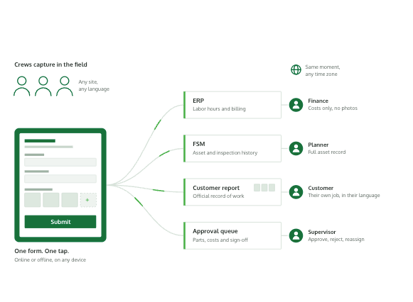 offline capability, and fit for enterprise field operations.
1. FormsPro: Best overall for job site data integration
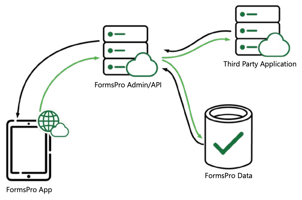
FormsPro gives your field crews a no-code, drag-and-drop form builder that works in full offline mode. Your techs capture inspection data, daily reports, and work order details on any device. FormsPro syncs submissions and mapped data fields directly to IFS, Infor, or other ERP platforms.
What sets OmniByte apart is deep integration: data maps push form entries to ERP endpoints on submission, so your back-office teams see accurate project costs and compliance records without re-keying a single line. Conditional logic in each form validates entries at the point of capture, which reduces errors before data ever reaches your system of record.
OmniByte has delivered documented results for enterprise deployments. One customer, Gordon Russell, reported that FormsPro reduced the gap between a service call and invoice by as much as two weeks. That kind of speed is what happens when field data and ERP data are connected without manual steps in between.
2. Autodesk Construction Cloud: Finance-to-field connectors for Autodesk users
Autodesk Construction Cloud uses partner connectors, such as Agave ERP Sync, to link Autodesk Build with accounting ERPs like Sage, Viewpoint, and Acumatica. Cost codes, commitments, and invoices can be synced between platforms. The tool is built around project management and document control rather than field-level data capture.
If your crews already work in Autodesk Build, these ERP connectors add financial visibility to your projects. The platform does not include a no-code form builder or device-level offline data capture for structured field reporting.
3. SAP S/4HANA for construction: ERP-native project controls
SAP offers construction modules under S/4HANA that cover finance, procurement, and project cost management. Third-party platforms like Smartapp ONE connect job site activities to SAP financial processes. SAP's strength is depth of back-office accounting and resource planning for large general contractors.
Field-level data capture appears to not be native to SAP's construction tools. Your crews will need additional mobile applications, middleware, or partner solutions to get structured job site data into the ERP without manual entry.
4. Oracle Smart Construction Platform: Scheduling and integration for Oracle environments
Oracle's Smart Construction Platform centers on Primavera scheduling and project controls. Integration adapters link Primavera Cloud to other Oracle products and select third-party tools. The platform is designed for project planning, resource allocation, and cost tracking at the enterprise level.
Oracle doesn't appear to offer a built-in mobile forms solution for capturing field inspection or daily report data at the job site. Crews working offline or in remote locations may require a separate data capture tool to feed structured information back to the ERP.
5. Procore: Project management with ERP sync
Procore connects project management, budgets, and RFIs with supported ERPs like Sage, Viewpoint, and QuickBooks through built-in integration tools. Job cost transactions sync to Procore's budget module, and authorized users can view direct cost details at the line-item level.
Procore seems to focus on project-level cost management and documentation rather than structured field data capture from mobile devices. If your team needs configurable digital forms with offline capability and conditional logic for on-site inspections, it likely requires a dedicated tool alongside Procore.
Why FormsPro is the best tool for job site data integration
The gap between your job site and your ERP costs you time, accuracy, and money. FormsPro closes that gap with field-first offline data capture, no-code configurability, and direct ERP integration that gets structured data into your back-office systems the moment your crew reconnects. According to a 2024 study published in MDPI Buildings, fragmented IT landscapes in construction remain one of the largest barriers to coordinated decision-making. FormsPro helps to remove that barrier.
Book a 15-minute walkthrough to see how FormsPro can handle your job site data.